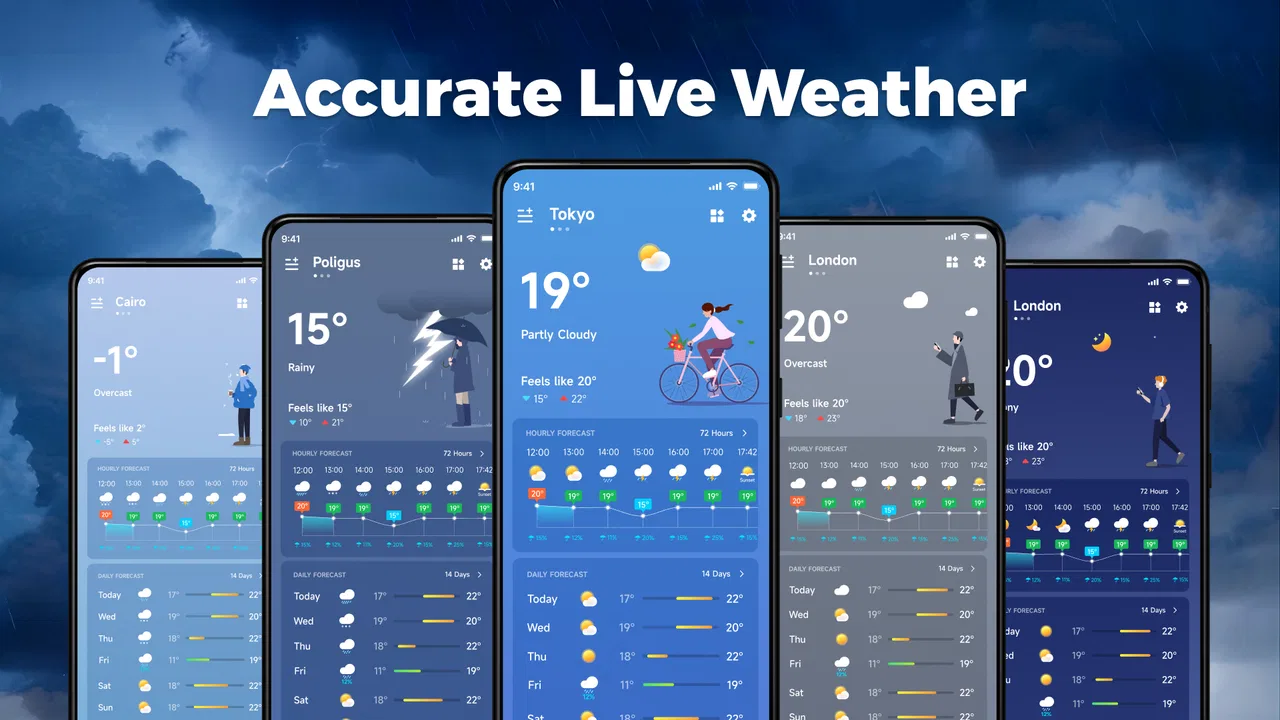
Accurate Live Weather
- 4.4
- Rating
- 500.00K
- Installs
- Free
- Price

 Analysis by App-foxy
I approached Accurate Live Weather as a practical weather companion rather than a feature-packed forecasting suite. After using it for everyday decisions, my view is fairly clear: it is most appealing when you want weather information quickly, without paying for the app or dealing with a complicated interface. The experience is centered on checking current conditions and planning the next part of your day, not on turning your phone into a professional meteorology workstation.
That focus is both its strongest quality and its main limitation. I like the straightforward idea behind it, especially for checking whether I should carry an umbrella, change the time of a walk, or prepare for a colder evening. At the same time, anyone expecting extensive weather analysis, specialist warnings, or a deep collection of planning tools may find the experience too modest. My recommendation is therefore specific: this is a sensible free choice for simple, frequent checks, but not the app I would choose as my only source for demanding outdoor decisions.
What using Accurate Live Weather feels like
The app sits in the weather category and comes from VoiTex Video Editor. Its store presentation is brief, but that brevity matches the way I prefer to use it. I open a weather app when I need an answer, not when I want to browse a complicated dashboard. Accurate Live Weather works best in that quick-check role, where the value comes from getting to the relevant conditions without unnecessary effort.
You May Also Like

 Blood Strike: 2.5 Anniversary
Blood Strike’s Loadouts Turn Every Drop Into a Tactical Gamble
A close look at Blood Strike’s custom loadouts: how fast access to signature weapons reshapes its battle royale rhythm, rewards preparation, and narrows the gap between fights.

 Pandora - Music & Podcasts
Pandora’s Music Is Easy to Start, but Harder to Recover
Pandora’s strength is its low-effort path from a seed to a station. Its weak spot is how much confidence it asks you to place in connection, setup, and quiet recovery.

 8 Ball Pool
 Is Built on Rivalries, Rematches, and Routine
A close look at the rivalries, rematches, shared routines, and unanswered safety questions that turn a quick pool match into a persistent mobile community.

 Samsung Music
’s Quiet Strength Is Playing What You Already Own
Its reach comes less from spectacle than from dependable access to a personal library. That simplicity is both the app’s strongest retention engine and its ceiling.

 AccuWeather: Weather Radar
AccuWeather Review: A Quick, Clear Forecast for Everyday Decisions
For everyday plans, the best forecast is the one you can understand quickly. AccuWeather makes rain timing, radar, and local conditions easy to act on, with a few trade-offs.

 Hill Climb Racing
Why Hill Climb Racing Still Turns Crashes Into One More Run
A tiny car, a bumpy hill and one more upgrade: Hill Climb Racing keeps resurfacing because its simple chaos makes every near-miss feel personal.
More From Our News Desk



In practical terms, I would use it at several small decision points throughout the day. Before leaving home, I can check whether the current situation looks comfortable for walking. Before commuting, I can use the forecast to decide whether a light jacket makes sense. Later, I might check again before shopping or exercising outdoors. These are ordinary moments, but they are exactly where an uncomplicated weather app earns its place on a phone.
The app is free, which makes trying it low-risk. It is also rated for Everyone, so it is positioned as a broadly accessible utility rather than a specialist tool aimed at a narrow audience. Its average rating is 4.4 from around 1.7 thousand ratings, and the app has passed 100 thousand installs. Those figures suggest that many people find the basic experience useful, although they should not be mistaken for proof that it will suit every location or every type of weather planning.
The current release is version 1.03.5 and it runs on Android 7.0 or later. That is helpful for people using older Android phones who do not want to replace a device simply to install a modern weather utility. I would still check the app’s behavior on the particular phone I use, because an older operating system can sometimes make an app feel different from the experience on a newer handset.
The strongest part is the quick decision workflow
My favorite aspect is not a flashy feature; it is the potential to make a basic weather check part of a routine. I can imagine putting the app in an easy-to-reach position on the home screen, opening it before leaving, and closing it once I have made a decision. That workflow is more useful than a crowded display filled with information I will not read.
A good example is a short school or work commute. I might check the weather while putting on my shoes, notice that the conditions are less comfortable than expected, and choose a coat or postpone a bicycle ride. The app does not need to dominate my attention in that situation. It only needs to present current weather and forecast information clearly enough for me to act.
There is also a useful distinction between checking the present and planning ahead. Current conditions answer “what is happening now?” A forecast helps with “what should I expect later?” I find it helpful to look at both rather than trusting a single glance. If the current weather looks fine but the later forecast suggests a change, that difference can affect whether I plan an outdoor errand immediately or wait.
One practical tip is to check the app at the moment a decision matters, rather than relying on a morning glance for the entire day. Weather can change, and a forecast is not a guarantee. A second check before a long walk, a trip across town, or an outdoor appointment gives the information more context. This is a habit I would recommend with any weather app, but it matters especially when the application is being used as a compact everyday tool rather than a detailed planning system.
Where it fits better than familiar alternatives
Many people already use a phone’s built-in weather widget, a search engine, or a larger weather service. Those alternatives can be perfectly adequate. The reason to try this app is not that every other option is automatically worse; it is that a dedicated weather application can feel more intentional than a small widget and less distracting than searching the web repeatedly.
Compared with a built-in widget, a dedicated app gives me a direct place to check weather instead of relying on a small glanceable panel. Compared with a general web search, it avoids mixing the weather check with unrelated results and pages. Compared with highly detailed weather platforms, it may feel less intimidating for someone who only wants a clear answer about current conditions and the near-term outlook.
That comparison also exposes the trade-off. A mature, feature-heavy weather service may be better for people who compare several forecast models, follow severe weather closely, plan photography around light, or need specialized information for sailing, hiking, farming, or aviation. Accurate Live Weather makes more sense when the question is ordinary and immediate: should I go now, what should I wear, and do I need to prepare for a change later?
I would not install it simply because it is free if I already have a weather app that gives me everything I need. Switching apps has a small cost in attention and routine. The stronger case for trying this one is wanting a simpler dedicated option, using an older Android device, or preferring a clean weather check over a broader service with many sections competing for attention.
Small habits that make the app more useful
The first habit is to interpret the forecast as planning guidance rather than certainty. If I am deciding whether to take a short walk, a general forecast may be enough. If I am arranging a long outdoor activity where a weather change could create a real problem, I would compare the information with another trusted source and look for official alerts relevant to my area.
The second is to use timing intelligently. Checking immediately after waking tells me how the day begins, but checking again before leaving tells me more about the conditions I will actually meet. For an evening plan, I would make a separate check in the afternoon. This reduces the common mistake of treating one early forecast as fixed throughout the day.
The third is to separate clothing decisions from activity decisions. A temperature that feels acceptable for a quick trip may not be comfortable for standing outside, cycling, or waiting for public transport. I use the app as the starting point, then add common sense about how long I will be outside and whether I can easily return indoors. That makes a simple forecast more useful without expecting the app to make the decision for me.
A fourth useful workflow is to check before committing to a route. If I am choosing between walking, cycling, and public transport, current conditions can influence the choice even when the forecast itself does not change. Wet roads, uncomfortable heat, or a sudden cold spell may make a short walk less attractive. The app is most effective when I connect its information to a concrete choice rather than opening it passively.
The meaningful weakness: simplicity can leave gaps
The main weakness is that a simple weather experience can become insufficient when the situation becomes more demanding. A person who wants a complete picture of changing conditions may need more than a quick current reading and general forecast. Weather decisions vary widely, and the information that is enough for a commute may not be enough for a mountain trip, a long drive, or an event where cancellation would be expensive.
I also think expectations need to be realistic around the word “accurate.” No weather application can make every forecast perfectly precise for every neighborhood and every moment. Local terrain, rapidly changing conditions, and the limits of forecasting all matter. I would judge this app by whether it helps with ordinary decisions, not by expecting it to eliminate uncertainty.
That limitation is not a reason to dismiss it, but it does define the boundary of responsible use. For severe weather, emergency preparation, or safety-critical travel, I would look for official alerts and a more comprehensive service as well. A lightweight app can be convenient while still not being the right single authority for serious conditions.
Another possible point of friction is the balance between accessibility and depth. New users may appreciate not having to learn a complicated weather vocabulary or interpret a dense collection of charts. More experienced users may find that same restraint frustrating if they want detailed comparisons or specialized views. In my opinion, this is a product choice rather than a defect: the app is easier to approach because it does not try to serve every weather enthusiast at once.
The developer name, VoiTex Video Editor, may also make some readers pause because it does not immediately sound like a weather-focused studio. I would not treat that alone as a reason to avoid the app, but I would pay attention to how consistently it works on my device and whether it fits my expectations after a few days of normal use. The practical test is more important than the name: can I open it quickly, understand what I see, and make a better everyday decision?
Who should use it, and who should choose something else?
I see Accurate Live Weather as a good match for students, commuters, families, and casual outdoor users who want a free weather app for routine checks. It is particularly suitable for someone who dislikes overloaded interfaces and wants one obvious destination for current weather and forecast information. The Everyone content rating also makes it a natural option for a broad household audience.
It may be useful for people with older Android phones too, since the minimum operating system is Android 7.0. That does not guarantee identical performance on every device, but it means the app is not restricted to only the newest phones. If a family member uses an older handset and needs a straightforward weather utility, this compatibility can make it worth considering.
I would be more cautious about recommending it as the only weather source for outdoor professionals, travelers crossing several regions, or people whose plans depend on detailed timing. Hikers, sailors, photographers, event organizers, and anyone monitoring dangerous conditions may prefer a service built around richer forecasting tools and official warning information. For those users, the simplicity that helps a casual user could feel like missing depth.
I would also suggest skipping it if a built-in weather tool already provides a smoother, more informative experience on your phone. There is no advantage in adding another app merely to duplicate an existing function. The best reason to choose this one is that its direct approach feels more convenient for your routine, not that every user needs a separate weather application.
My final view after weighing convenience against depth
Accurate Live Weather succeeds when I treat it as a fast, everyday weather check. It is free, broadly accessible, compatible with Android 7.0 and later, and focused enough to support simple decisions without demanding much time. Its 4.4 average and more than 100 thousand installs show that it has found an audience, while the relatively small review count means I would still make my own judgment based on how it behaves in my location.
My clear thesis is that this is a useful entry-level weather companion, not a replacement for every specialized forecasting need. I would recommend installing it if you want a dedicated app for checking current conditions and planning ordinary activities, especially when a cluttered weather service feels excessive. I would not rely on it alone for safety-critical decisions or detailed outdoor planning.
The best way to evaluate it is to use it during a normal week. Check it before commuting, compare the current conditions with what you experience outside, and revisit it before an evening plan. If that simple routine gives you the information you need, the app has done its job. If you keep looking for deeper details, the right conclusion is not that you are using it incorrectly; it is that a more advanced weather service would better match your needs.
For me, the appeal is its restraint. It earns a place on the phone when quick, practical weather awareness matters more than a long list of specialist tools. That makes it easy to recommend to casual users, while its limits are clear enough that experienced weather watchers should look beyond it.
FAQs for Accurate Live Weather
01What makes Accurate Live Weather different from other weather apps?
Accurate Live Weather stands out due to its real-time weather updates and hyper-localized forecasts. Unlike other apps that rely on generic data, it uses advanced technology to provide precise information specific to your location. This feature ensures you receive timely alerts and updates tailored to your needs.
02Does Accurate Live Weather support multiple locations?
Yes, Accurate Live Weather allows users to track weather conditions in multiple locations. This feature is particularly useful for travelers or those who have family and friends in different cities. You can easily switch between locations to get updated forecasts and alerts wherever you are.
03Is Accurate Live Weather free to use?
Accurate Live Weather offers a free version with essential features such as daily forecasts and weather alerts. However, for advanced features like radar maps and extended forecasts, there is a premium version available. Users can choose based on their needs and preferences.
04How accurate are the forecasts provided by Accurate Live Weather?
The app utilizes state-of-the-art technology and data from reliable meteorological sources to ensure high accuracy in its forecasts. Users can expect precise predictions with updates every hour. This commitment to accuracy makes it a trusted choice for weather enthusiasts and everyday users alike.
05Does Accurate Live Weather offer severe weather alerts?
Yes, the app provides timely severe weather alerts to keep users informed of any potential threats like storms, heavy rain, or extreme temperatures. These alerts are crucial for planning and safety, allowing users to prepare for any unexpected weather changes.
Pros
- Real-time updates for precise planning.
- User-friendly interface simplifies navigation.
- Customizable alerts for severe weather.
- Detailed forecasts for multiple locations.
- Integration with calendar for event planning.
Cons
- Ad-supported version can be intrusive.
- Requires strong internet for live updates.
- Limited offline functionality.
- Battery usage can be high with GPS on.
- Some features locked behind paywall.

Accurate Live Weather
Gallery